
Kinegrams
What is a Kinegram?
A kinegram (pronounced "KIN-uh-gram") is a moving picture you can make with paper and plastic. The word comes from "kine-" meaning "moving" and "-gram" meaning "drawing". It is also called barrier grid animation or scanimation.
A kinegram has two parts: (1) an underlying picture with a complicated striped pattern and (2) an overlay of alternating clear and solid stripes on a sheet of clear plastic. When the overlay is moved up and down in front of the picture, you will see the motion, such as wheels turning or circles expanding and contracting.

(without overlay)
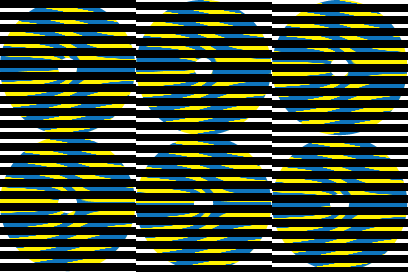
(with moving overlay)

(without overlay)
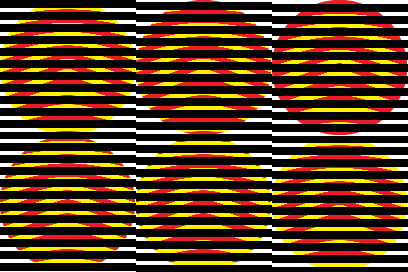
(with moving overlay)
The kinegrams found on toys use a lenticular sheet instead of a striped overlay. This is a clear plastic sheet with parallel rounded ridges that act like lenses. The ridges are aligned horizontally and the motion effect is produced by tilting the kinegram back and forth. (Lenticular sheets can also be used for 3-D images, with the ridges aligned vertically so your left and right eyes see different images.
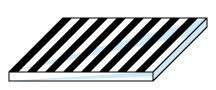
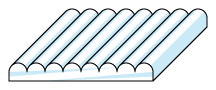
Kinegrams are related to Moiré (pronounced "MWA-ray") patterns, which are the patterns you see when look through two window screens.
How to Make the Picture Move
With Paper and Plastic, Not Electronics!
The cool thing about kinegrams is that the picture moves using just a sheet of paper and a sheet of plastic, without any electronics!

Step 1: Print the kinegrams on paper. Here are several kinegrams in printable Adobe Acrobat PDF files.
- Printable Kinegrams 1 (PDF). Basic kinegram patterns to cut and paste.
- Printable Kinegrams 2 (PDF). More kinegrams.
Step 2: Print the striped overlay pattern on a sheet of clear plastic. You can get printable clear plastic at an office supply store. If you cannot print directly onto clear plastic, then you can print the overlay on paper and then photocopy it onto clear plastic. Here are several printable overlays in Adobe Acrobat PDF files. The thickness of the black and clear stripes are different, but the overall pitch is the same, 12 lines per inch, so all these overlays will work on all these kinegrams. Thinner clear stripes will make the kinegram appear sharper but dimmer; whereas thicker clear stripes will make the kinegram appear brighter but blurrier.
- Printable Overlay 50% (1/2 clear) (PDF). Makes image bright but blurry.
- Printable Overlay 33% (1/3 clear) (PDF). Makes image medium bright and medium sharp.
- Printable Overlay 25% (1/4 clear) (PDF). Makes image dimmer but sharper.
- Printable Overlay 16% (1/6 clear) (PDF). Makes image dimmer but sharper.
- Printable Overlay 08% (1/12 clear) (PDF). Makes image very dim but very sharp.
Step 3: Action! Place the overlay on the kinegram, with the lines horizontal, and move it slowly up and down to see the motion, such as wheels turning. The overlay must be lined up precisely with the kinegram. It is helpful to make a sleeve of folded paper to keep the overlay straight.
Printing Scale: When printed at 100% scale, the overlays have exactly 12 lines per inch (LPI) and most of the kinegram images will be exactly 4 inches high. The overlay must be printed at the exact same print scale as the underlying kinegrams. It is best to print the PDF files provided here, rather than printing the PNG images from the web page, because you can better control the print scale. If you reduce or enlarge anything, then you must reduce or enlarge all the kinegrams and the overlay by the exact same percentage. To help you check the scale of your printouts, most of the kinegrams on these pages have alignment marks (tiny blue dots on the left and right sides) that should exactly match the overlay pitch.
Sample Kinegram
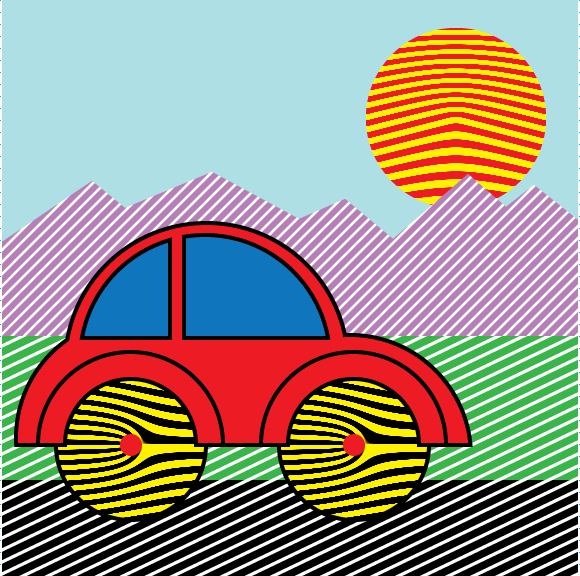
When the striped overlay is moved up and down in front of this kinegram, the wheels of the car will turn, the road will move horizontally, and the sun will pulse in or out.

More Kinegrams
You can see more kinegrams here:
- Kinegrams 1 (web page). Basic kinegram patterns.
- Kinegrams 2 (web page). More kinegrams.
Making Your Own Cut-and-Paste Kinegram Scenes
You can make your own kinegram scenes including funny faces, vehicles, abstract patterns, etc. by printing the kinegram patterns on paper and cutting and pasting them into a big picture, like a collage. It's fun to make your own cut-and-paste kinegram birthday cards or other holiday cards. You can do the cutting and pasting literally with paper, scissors, and glue, or you can do it on the computer in your favorite drawing/painting application.
Most of the kinegram patterns on these pages have a preferred horizontal direction, which must match the horizontal stripes of the overlay. If you are using scissors and glue (not a computer) to combine pictures, then be careful to line up the pieces exactly. Do not change the size of the kinegrams or the overlay. If you reduce or enlarge anything, then you must reduce or enlarge all the kinegrams and the overlay by the exact same percentage. Do not rotate the pieces. You may mirror the pieces. You may change the colors.
More Info
For more info about this kind of animation, search the web for barrier grid animation, picket fence animation, scanimation, kinegram, moiré pattern, lenticular sheet, lenticular screen, or lenticular film.
You can make your own new kinegram animations if you are a skillful user of a computer drawing or painting application. There are detailed instructions here: Making Kinegram Animations.